VEYE IMAGING Forum
    • Categories
    • Tags
    • Recent
    • Popular
    • Users
    • WIKI
    • veye.cc
    • Register
    • Login

    移植MV-IMX265驱动程序到迅为RK3568抓图卡死


    Scheduled Pinned Locked Moved VEYE MIPI camera
    39 Posts 2 Posters 18.3k Views 1 Watching
    Loading More Posts
    • Oldest to Newest
    • Newest to Oldest
    • Most Votes
    Reply
    • Reply as topic
    Log in to reply
    This topic has been deleted. Only users with topic management privileges can see it.
    • W Offline
      w88121446 @veye_xumm
      last edited by

      @veye_xumm 我先弄个5.10试试,不过对我这边很麻烦,还关系到其他同事。4.19还有抢救的希望吗?

      veye_xummV 1 Reply Last reply Reply Quote 0
      • veye_xummV Offline
        veye_xumm @w88121446
        last edited by

        @w88121446 这个我这边不清楚,没法给你有效的参考信息。

        Questions will be answered as soon as possible, please be patient.
        如果你使用中文,请直接用中文提问。
        May the force be with YOU. (This is the translation of the mysterious Chinese symbol above.)

        W 1 Reply Last reply Reply Quote 0
        • W Offline
          w88121446 @veye_xumm
          last edited by w88121446

          @veye_xumm 您好,我现在在5.10的内核中可以正确发现MV-IMX265了。目前遇到两个问题
          1.是发送《v4l2-ctl -L》
          回复如下图,不回复FPS等信息了

          4c3f0dd1-de83-4ec7-a8f0-68d28ca64862-image.png

          2.是发送《v4l2-ctl --set-ctrl frame_rate=10》设置帧率是会报错

          30822052-67c6-4d50-abce-11a30a1029ae-image.png

          请您指点一下

          veye_xummV 1 Reply Last reply Reply Quote 0
          • veye_xummV Offline
            veye_xumm @w88121446
            last edited by

            @w88121446
            配参数应该配置到/dev/v4l-subdev2 吧?
            你可以参考参考part7.2

            Questions will be answered as soon as possible, please be patient.
            如果你使用中文,请直接用中文提问。
            May the force be with YOU. (This is the translation of the mysterious Chinese symbol above.)

            W 1 Reply Last reply Reply Quote 0
            • W Offline
              w88121446 @veye_xumm
              last edited by

              @veye_xumm 图像可以采集出来了,想实时预览的话有什么办法吗?

              veye_xummV 2 Replies Last reply Reply Quote 0
              • veye_xummV Offline
                veye_xumm @w88121446
                last edited by

                @w88121446 said in 移植MV-IMX265驱动程序到迅为RK3568抓图卡死:

                @veye_xumm 图像可以采集出来了,想实时预览的话有什么办法吗?

                我们wiki上面提到一个python脚本,可以做预览,你可以参考一下。

                Questions will be answered as soon as possible, please be patient.
                如果你使用中文,请直接用中文提问。
                May the force be with YOU. (This is the translation of the mysterious Chinese symbol above.)

                W 1 Reply Last reply Reply Quote 0
                • W Offline
                  w88121446 @veye_xumm
                  last edited by

                  @veye_xumm 暂时没有python环境,我尝试使用gstreamer里的脚本预览
                  设置成这样:media-ctl -d /dev/media0 --set-v4l2 '"m00_b_mvcam 2-003b":0[fmt:Y8_1X8/2048x1544@1/30]'
                  然后再预览:gst-launch-1.0 v4l2src device=/dev/video1 io-mode=4 ! queue ! video/x-raw,format=NV12,width=2048,height=1544,framerate=30/1 ! glimagesink
                  出来的图颜色不对,有时绿有时粉,方向也不时我想要的,该如何旋转。

                  如果设置成这样:media-ctl -d /dev/media0 --set-v4l2 '"m00_b_mvcam 2-003b":0[fmt:UYVY8_2X8/2048x1544@1/30]'
                  然后再预览:gst-launch-1.0 v4l2src device=/dev/video1 io-mode=4 ! queue ! video/x-raw,format=NV12,width=2048,height=1544,framerate=30/1 ! glimagesink
                  不出图。

                  麻烦您指导一下,我的模块是MV-IMX265

                  veye_xummV 1 Reply Last reply Reply Quote 0
                  • veye_xummV Offline
                    veye_xumm @w88121446
                    last edited by

                    @w88121446
                    对于只支持单色RAW8格式的camera,直接通过gstreamer进行预览,我们现在觉得支持度不够。
                    建议你还是用python调用一下opencv跑一下,这个是最简单的。

                    Questions will be answered as soon as possible, please be patient.
                    如果你使用中文,请直接用中文提问。
                    May the force be with YOU. (This is the translation of the mysterious Chinese symbol above.)

                    W 1 Reply Last reply Reply Quote 0
                    • W Offline
                      w88121446 @veye_xumm
                      last edited by

                      @veye_xumm 好的,感谢您的帮助。

                      veye_xummV 1 Reply Last reply Reply Quote 0
                      • veye_xummV Offline
                        veye_xumm @w88121446
                        last edited by

                        @w88121446 不客气

                        Questions will be answered as soon as possible, please be patient.
                        如果你使用中文,请直接用中文提问。
                        May the force be with YOU. (This is the translation of the mysterious Chinese symbol above.)

                        W 1 Reply Last reply Reply Quote 0
                        • W Offline
                          w88121446 @veye_xumm
                          last edited by

                          @veye_xumm 用C++调用OPENCV也可以预览到正常的图像把。

                          veye_xummV 1 Reply Last reply Reply Quote 0
                          • veye_xummV Offline
                            veye_xumm @w88121446
                            last edited by

                            @w88121446
                            应该没问题的。 不过我们缺乏应用层尤其是opencv的经验。 我理解是python调用opencv能预览,用c++应该就可以。
                            opencv的主要问题是效率问题,数据导入到opencv的时候需要用cpu跑一次数据格式转换。

                            Questions will be answered as soon as possible, please be patient.
                            如果你使用中文,请直接用中文提问。
                            May the force be with YOU. (This is the translation of the mysterious Chinese symbol above.)

                            W 1 Reply Last reply Reply Quote 0
                            • W Offline
                              w88121446 @veye_xumm
                              last edited by w88121446

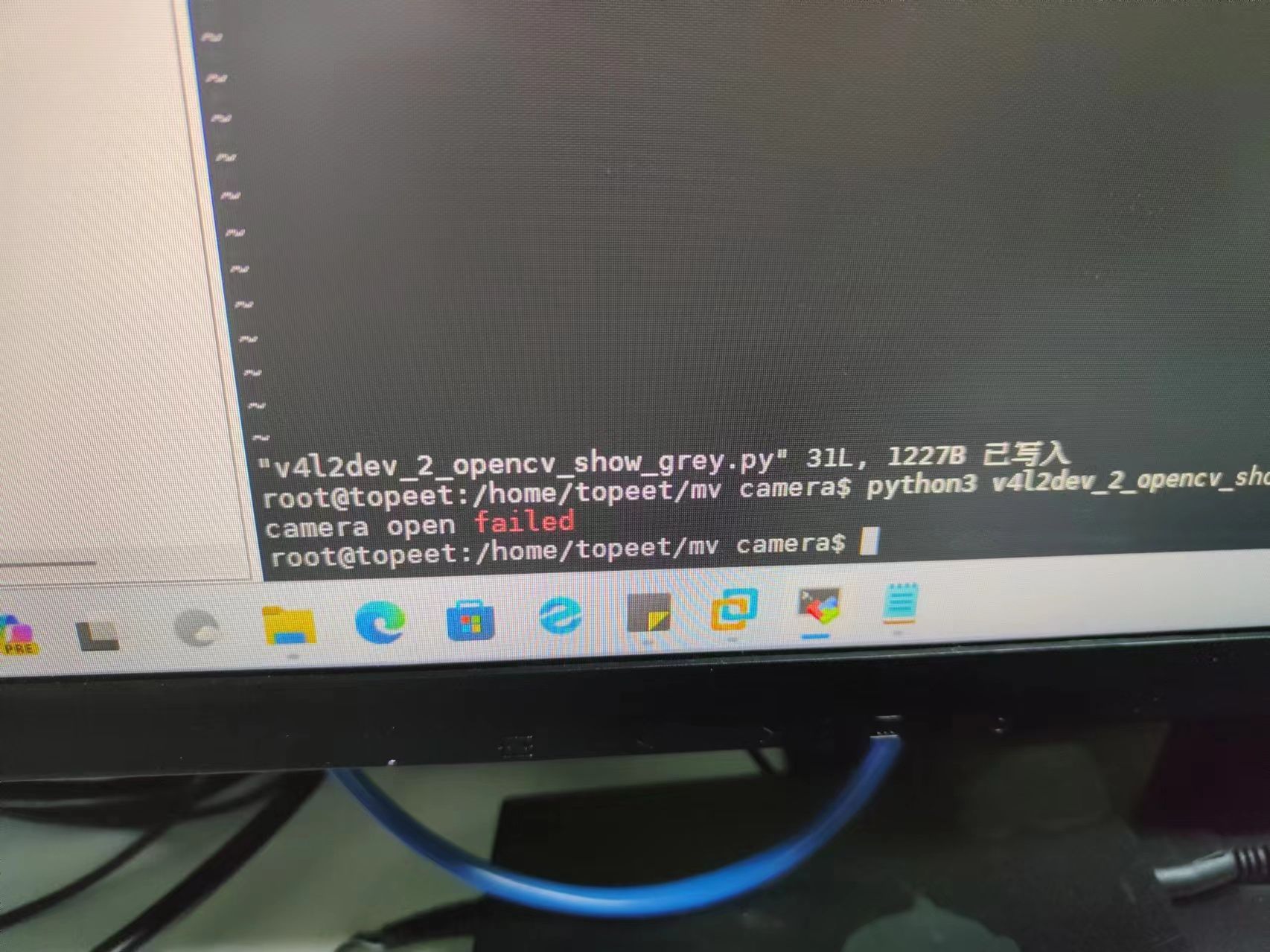
                              @veye_xumm 我用《v4l2dev_2_opencv_show_grey.py》这个文件,报错camera open failed.
                              麻烦指导一下

                              veye_xummV 1 Reply Last reply Reply Quote 0
                              • veye_xummV Offline
                                veye_xumm @w88121446
                                last edited by

                                @w88121446
                                是参考我们在rk平台的这个python程序吗? 能否截图看一下具体错误?
                                /dev/video0是否存在?

                                Questions will be answered as soon as possible, please be patient.
                                如果你使用中文,请直接用中文提问。
                                May the force be with YOU. (This is the translation of the mysterious Chinese symbol above.)

                                W 1 Reply Last reply Reply Quote 0
                                • W Offline
                                  w88121446 @veye_xumm
                                  last edited by

                                  @veye_xumm /dev/video0确认存在的,用的下面这个PY脚本

                                  import sys
                                  import argparse
                                  import subprocess
                                  import cv2
                                  
                                  def read_cam(width, height, fps,i2c):
                                      
                                      v4l2_cmd = f'media-ctl -d /dev/media0 --set-v4l2 \'"m00_b_mvcam 2-003b":0[fmt:Y8_1X8/{width}x{height}@1/{fps} field:none]\''
                                      subprocess.run(v4l2_cmd, shell=True)
                                      
                                      cap = cv2.VideoCapture(f"v4l2src io-mode=dmabuf device=/dev/video0 ! video/x-raw, format=(string)GRAY8, width=(int){width}, height=(int){height} ! appsink")
                                      if cap.isOpened():
                                          cv2.namedWindow("demo", cv2.WINDOW_AUTOSIZE)
                                          while True:
                                              ret_val, img = cap.read();
                                              cv2.imshow('demo',img)
                                              cv2.waitKey(1)
                                      else:
                                       print ("camera open failed");
                                  
                                      cv2.destroyAllWindows()
                                  if __name__ == '__main__':
                                      parser = argparse.ArgumentParser(description='Read camera video stream')
                                      parser.add_argument('--width', type=int, default=1080, help='width of the video stream')
                                      parser.add_argument('--height', type=int, default=1080, help='height of the video stream')
                                      parser.add_argument('--fps', type=int, default=30, help='fps of the video stream')
                                      parser.add_argument('--i2c', type=int, default=7, help='i2c bus number')
                                      args = parser.parse_args()
                                  
                                      read_cam(args.width, args.height, args.fps, args.i2c)
                                  

                                  报错如下
                                  23ca28c19180d09616cfb3508239726.jpg

                                  veye_xummV 1 Reply Last reply Reply Quote 0
                                  • veye_xummV Offline
                                    veye_xumm @w88121446
                                    last edited by

                                    @w88121446 调用的时候参数是怎么写的? i2cbus写对了吗?

                                    Questions will be answered as soon as possible, please be patient.
                                    如果你使用中文,请直接用中文提问。
                                    May the force be with YOU. (This is the translation of the mysterious Chinese symbol above.)

                                    W 1 Reply Last reply Reply Quote 0
                                    • W Offline
                                      w88121446 @veye_xumm
                                      last edited by

                                      @veye_xumm
                                      我是这么写的,我的I2C用的I2C2,产品分辨率2048*1544

                                      import sys
                                      import argparse
                                      import subprocess
                                      import cv2
                                      
                                      def read_cam(width, height, fps,i2c):
                                          
                                          v4l2_cmd = f'media-ctl -d /dev/media0 --set-v4l2 \'"m00_b_mvcam {i2c}-003b":0[fmt:Y8_1X8/{width}x{height}@1/{fps} field:none]\''
                                          subprocess.run(v4l2_cmd, shell=True)
                                          
                                          cap = cv2.VideoCapture(f"v4l2src io-mode=dmabuf device=/dev/video0 ! video/x-raw, format=(string)GRAY8, width=(int){width}, height=(int){height} ! appsink")
                                          if cap.isOpened():
                                              cv2.namedWindow("demo", cv2.WINDOW_AUTOSIZE)
                                              while True:
                                                  ret_val, img = cap.read();
                                                  cv2.imshow('demo',img)
                                                  cv2.waitKey(1)
                                          else:
                                           print ("camera open failed");
                                          cv2.destroyAllWindows()
                                      if __name__ == '__main__':
                                          parser = argparse.ArgumentParser(description='Read camera video stream')
                                          parser.add_argument('--width', type=int, default=2048, help='width of the video stream')
                                          parser.add_argument('--height', type=int, default=1544, help='height of the video stream')
                                          parser.add_argument('--fps', type=int, default=30, help='fps of the video stream')
                                          parser.add_argument('--i2c', type=int, default=2, help='i2c bus number')
                                          args = parser.parse_args()
                                          read_cam(args.width, args.height, args.fps, args.i2c)
                                      
                                      veye_xummV 1 Reply Last reply Reply Quote 0
                                      • veye_xummV Offline
                                        veye_xumm @w88121446
                                        last edited by

                                        @w88121446 不好意思我没有说清楚,我的意思是,你调用这个脚本的时候,使用的命令行是什么?参数是什么?

                                        Questions will be answered as soon as possible, please be patient.
                                        如果你使用中文,请直接用中文提问。
                                        May the force be with YOU. (This is the translation of the mysterious Chinese symbol above.)

                                        W 1 Reply Last reply Reply Quote 0
                                        • W Offline
                                          w88121446 @veye_xumm
                                          last edited by

                                          @veye_xumm这样调用的

                                          python3 v4l2dev_2_opencv_show_grey.py

                                          veye_xummV 1 Reply Last reply Reply Quote 0
                                          • veye_xummV Offline
                                            veye_xumm @w88121446
                                            last edited by

                                            @w88121446
                                            需要给一下必要的参数

                                            python3 ./v4l2dev_2_opencv_show_grey.py --width 2048 --height 1544 --fps 45 --i2c 2

                                            

                                            Questions will be answered as soon as possible, please be patient.
                                            如果你使用中文,请直接用中文提问。
                                            May the force be with YOU. (This is the translation of the mysterious Chinese symbol above.)

                                            W 1 Reply Last reply Reply Quote 0

                                            Hello! It looks like you're interested in this conversation, but you don't have an account yet.

                                            Getting fed up of having to scroll through the same posts each visit? When you register for an account, you'll always come back to exactly where you were before, and choose to be notified of new replies (either via email, or push notification). You'll also be able to save bookmarks and upvote posts to show your appreciation to other community members.

                                            With your input, this post could be even better 💗

                                            Register Login
                                            • First post
                                              Last post