VEYE IMAGING Forum
    • Categories
    • Tags
    • Recent
    • Popular
    • Users
    • WIKI
    • veye.cc
    • Register
    • Login

    移植MV-IMX265驱动程序到迅为RK3568抓图卡死


    Scheduled Pinned Locked Moved VEYE MIPI camera
    39 Posts 2 Posters 18.2k Views 1 Watching
    Loading More Posts
    • Oldest to Newest
    • Newest to Oldest
    • Most Votes
    Reply
    • Reply as topic
    Log in to reply
    This topic has been deleted. Only users with topic management privileges can see it.
    • veye_xummV Offline
      veye_xumm @w88121446
      last edited by

      @w88121446
      配参数应该配置到/dev/v4l-subdev2 吧?
      你可以参考参考part7.2

      Questions will be answered as soon as possible, please be patient.
      如果你使用中文,请直接用中文提问。
      May the force be with YOU. (This is the translation of the mysterious Chinese symbol above.)

      W 1 Reply Last reply Reply Quote 0
      • W Offline
        w88121446 @veye_xumm
        last edited by

        @veye_xumm 图像可以采集出来了,想实时预览的话有什么办法吗?

        veye_xummV 2 Replies Last reply Reply Quote 0
        • veye_xummV Offline
          veye_xumm @w88121446
          last edited by

          @w88121446 said in 移植MV-IMX265驱动程序到迅为RK3568抓图卡死:

          @veye_xumm 图像可以采集出来了,想实时预览的话有什么办法吗?

          我们wiki上面提到一个python脚本,可以做预览,你可以参考一下。

          Questions will be answered as soon as possible, please be patient.
          如果你使用中文,请直接用中文提问。
          May the force be with YOU. (This is the translation of the mysterious Chinese symbol above.)

          W 1 Reply Last reply Reply Quote 0
          • W Offline
            w88121446 @veye_xumm
            last edited by

            @veye_xumm 暂时没有python环境,我尝试使用gstreamer里的脚本预览
            设置成这样:media-ctl -d /dev/media0 --set-v4l2 '"m00_b_mvcam 2-003b":0[fmt:Y8_1X8/2048x1544@1/30]'
            然后再预览:gst-launch-1.0 v4l2src device=/dev/video1 io-mode=4 ! queue ! video/x-raw,format=NV12,width=2048,height=1544,framerate=30/1 ! glimagesink
            出来的图颜色不对,有时绿有时粉,方向也不时我想要的,该如何旋转。

            如果设置成这样:media-ctl -d /dev/media0 --set-v4l2 '"m00_b_mvcam 2-003b":0[fmt:UYVY8_2X8/2048x1544@1/30]'
            然后再预览:gst-launch-1.0 v4l2src device=/dev/video1 io-mode=4 ! queue ! video/x-raw,format=NV12,width=2048,height=1544,framerate=30/1 ! glimagesink
            不出图。

            麻烦您指导一下,我的模块是MV-IMX265

            veye_xummV 1 Reply Last reply Reply Quote 0
            • veye_xummV Offline
              veye_xumm @w88121446
              last edited by

              @w88121446
              对于只支持单色RAW8格式的camera,直接通过gstreamer进行预览,我们现在觉得支持度不够。
              建议你还是用python调用一下opencv跑一下,这个是最简单的。

              Questions will be answered as soon as possible, please be patient.
              如果你使用中文,请直接用中文提问。
              May the force be with YOU. (This is the translation of the mysterious Chinese symbol above.)

              W 1 Reply Last reply Reply Quote 0
              • W Offline
                w88121446 @veye_xumm
                last edited by

                @veye_xumm 好的,感谢您的帮助。

                veye_xummV 1 Reply Last reply Reply Quote 0
                • veye_xummV Offline
                  veye_xumm @w88121446
                  last edited by

                  @w88121446 不客气

                  Questions will be answered as soon as possible, please be patient.
                  如果你使用中文,请直接用中文提问。
                  May the force be with YOU. (This is the translation of the mysterious Chinese symbol above.)

                  W 1 Reply Last reply Reply Quote 0
                  • W Offline
                    w88121446 @veye_xumm
                    last edited by

                    @veye_xumm 用C++调用OPENCV也可以预览到正常的图像把。

                    veye_xummV 1 Reply Last reply Reply Quote 0
                    • veye_xummV Offline
                      veye_xumm @w88121446
                      last edited by

                      @w88121446
                      应该没问题的。 不过我们缺乏应用层尤其是opencv的经验。 我理解是python调用opencv能预览,用c++应该就可以。
                      opencv的主要问题是效率问题,数据导入到opencv的时候需要用cpu跑一次数据格式转换。

                      Questions will be answered as soon as possible, please be patient.
                      如果你使用中文,请直接用中文提问。
                      May the force be with YOU. (This is the translation of the mysterious Chinese symbol above.)

                      W 1 Reply Last reply Reply Quote 0
                      • W Offline
                        w88121446 @veye_xumm
                        last edited by w88121446

                        @veye_xumm 我用《v4l2dev_2_opencv_show_grey.py》这个文件,报错camera open failed.
                        麻烦指导一下

                        veye_xummV 1 Reply Last reply Reply Quote 0
                        • veye_xummV Offline
                          veye_xumm @w88121446
                          last edited by

                          @w88121446
                          是参考我们在rk平台的这个python程序吗? 能否截图看一下具体错误?
                          /dev/video0是否存在?

                          Questions will be answered as soon as possible, please be patient.
                          如果你使用中文,请直接用中文提问。
                          May the force be with YOU. (This is the translation of the mysterious Chinese symbol above.)

                          W 1 Reply Last reply Reply Quote 0
                          • W Offline
                            w88121446 @veye_xumm
                            last edited by

                            @veye_xumm /dev/video0确认存在的,用的下面这个PY脚本

                            import sys
                            import argparse
                            import subprocess
                            import cv2
                            
                            def read_cam(width, height, fps,i2c):
                                
                                v4l2_cmd = f'media-ctl -d /dev/media0 --set-v4l2 \'"m00_b_mvcam 2-003b":0[fmt:Y8_1X8/{width}x{height}@1/{fps} field:none]\''
                                subprocess.run(v4l2_cmd, shell=True)
                                
                                cap = cv2.VideoCapture(f"v4l2src io-mode=dmabuf device=/dev/video0 ! video/x-raw, format=(string)GRAY8, width=(int){width}, height=(int){height} ! appsink")
                                if cap.isOpened():
                                    cv2.namedWindow("demo", cv2.WINDOW_AUTOSIZE)
                                    while True:
                                        ret_val, img = cap.read();
                                        cv2.imshow('demo',img)
                                        cv2.waitKey(1)
                                else:
                                 print ("camera open failed");
                            
                                cv2.destroyAllWindows()
                            if __name__ == '__main__':
                                parser = argparse.ArgumentParser(description='Read camera video stream')
                                parser.add_argument('--width', type=int, default=1080, help='width of the video stream')
                                parser.add_argument('--height', type=int, default=1080, help='height of the video stream')
                                parser.add_argument('--fps', type=int, default=30, help='fps of the video stream')
                                parser.add_argument('--i2c', type=int, default=7, help='i2c bus number')
                                args = parser.parse_args()
                            
                                read_cam(args.width, args.height, args.fps, args.i2c)
                            

                            报错如下
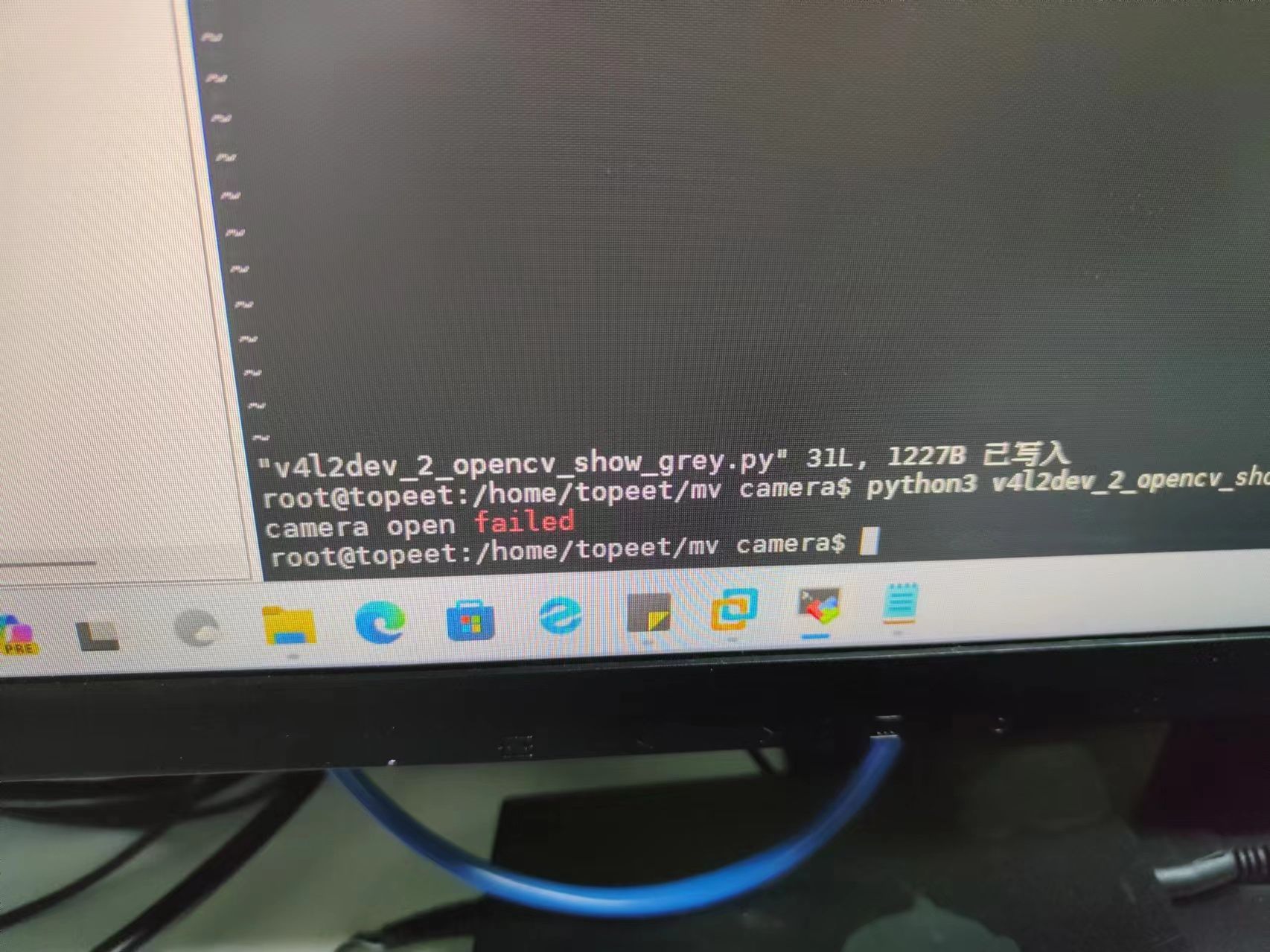
                            23ca28c19180d09616cfb3508239726.jpg

                            veye_xummV 1 Reply Last reply Reply Quote 0
                            • veye_xummV Offline
                              veye_xumm @w88121446
                              last edited by

                              @w88121446 调用的时候参数是怎么写的? i2cbus写对了吗?

                              Questions will be answered as soon as possible, please be patient.
                              如果你使用中文,请直接用中文提问。
                              May the force be with YOU. (This is the translation of the mysterious Chinese symbol above.)

                              W 1 Reply Last reply Reply Quote 0
                              • W Offline
                                w88121446 @veye_xumm
                                last edited by

                                @veye_xumm
                                我是这么写的,我的I2C用的I2C2,产品分辨率2048*1544

                                import sys
                                import argparse
                                import subprocess
                                import cv2
                                
                                def read_cam(width, height, fps,i2c):
                                    
                                    v4l2_cmd = f'media-ctl -d /dev/media0 --set-v4l2 \'"m00_b_mvcam {i2c}-003b":0[fmt:Y8_1X8/{width}x{height}@1/{fps} field:none]\''
                                    subprocess.run(v4l2_cmd, shell=True)
                                    
                                    cap = cv2.VideoCapture(f"v4l2src io-mode=dmabuf device=/dev/video0 ! video/x-raw, format=(string)GRAY8, width=(int){width}, height=(int){height} ! appsink")
                                    if cap.isOpened():
                                        cv2.namedWindow("demo", cv2.WINDOW_AUTOSIZE)
                                        while True:
                                            ret_val, img = cap.read();
                                            cv2.imshow('demo',img)
                                            cv2.waitKey(1)
                                    else:
                                     print ("camera open failed");
                                    cv2.destroyAllWindows()
                                if __name__ == '__main__':
                                    parser = argparse.ArgumentParser(description='Read camera video stream')
                                    parser.add_argument('--width', type=int, default=2048, help='width of the video stream')
                                    parser.add_argument('--height', type=int, default=1544, help='height of the video stream')
                                    parser.add_argument('--fps', type=int, default=30, help='fps of the video stream')
                                    parser.add_argument('--i2c', type=int, default=2, help='i2c bus number')
                                    args = parser.parse_args()
                                    read_cam(args.width, args.height, args.fps, args.i2c)
                                
                                veye_xummV 1 Reply Last reply Reply Quote 0
                                • veye_xummV Offline
                                  veye_xumm @w88121446
                                  last edited by

                                  @w88121446 不好意思我没有说清楚,我的意思是,你调用这个脚本的时候,使用的命令行是什么?参数是什么?

                                  Questions will be answered as soon as possible, please be patient.
                                  如果你使用中文,请直接用中文提问。
                                  May the force be with YOU. (This is the translation of the mysterious Chinese symbol above.)

                                  W 1 Reply Last reply Reply Quote 0
                                  • W Offline
                                    w88121446 @veye_xumm
                                    last edited by

                                    @veye_xumm这样调用的

                                    python3 v4l2dev_2_opencv_show_grey.py

                                    veye_xummV 1 Reply Last reply Reply Quote 0
                                    • veye_xummV Offline
                                      veye_xumm @w88121446
                                      last edited by

                                      @w88121446
                                      需要给一下必要的参数

                                      python3 ./v4l2dev_2_opencv_show_grey.py --width 2048 --height 1544 --fps 45 --i2c 2
                                      

                                      Questions will be answered as soon as possible, please be patient.
                                      如果你使用中文,请直接用中文提问。
                                      May the force be with YOU. (This is the translation of the mysterious Chinese symbol above.)

                                      W 1 Reply Last reply Reply Quote 0
                                      • W Offline
                                        w88121446 @veye_xumm
                                        last edited by w88121446

                                        @veye_xumm 我使用您发给我的命令还是不能打开caramer,再次确认了是I2C-2没有错

                                        8edbc1da-117c-40ac-b30b-685045e7dc65-image.png

                                        1 Reply Last reply Reply Quote 0
                                        • veye_xummV Offline
                                          veye_xumm @w88121446
                                          last edited by

                                          @w88121446 said in 移植MV-IMX265驱动程序到迅为RK3568抓图卡死:

                                          图像可以采集出来了,想实时预览的话有什么办法吗?

                                          此时你说的图像可以采集出来,是怎么判断的?

                                          Questions will be answered as soon as possible, please be patient.
                                          如果你使用中文,请直接用中文提问。
                                          May the force be with YOU. (This is the translation of the mysterious Chinese symbol above.)

                                          W 1 Reply Last reply Reply Quote 0
                                          • W Offline
                                            w88121446 @veye_xumm
                                            last edited by

                                            @veye_xumm 可以使用下面这个命令拍照,图片正常

                                            ./yavta -c1 -Fy81-2048x1544.raw --skip 0 -f Y8 -s 2048x1544 /dev/video0

                                            
                                            veye_xummV 1 Reply Last reply Reply Quote 0

                                            Hello! It looks like you're interested in this conversation, but you don't have an account yet.

                                            Getting fed up of having to scroll through the same posts each visit? When you register for an account, you'll always come back to exactly where you were before, and choose to be notified of new replies (either via email, or push notification). You'll also be able to save bookmarks and upvote posts to show your appreciation to other community members.

                                            With your input, this post could be even better 💗

                                            Register Login
                                            • First post
                                              Last post