VEYE IMAGING Forum
    • Categories
    • Tags
    • Recent
    • Popular
    • Users
    • WIKI
    • veye.cc
    • Register
    • Login

    Camera sync mode

    Scheduled Pinned Locked Moved FPD LINK III Camera
    31 Posts 2 Posters 21.4k Views 1 Watching
    Loading More Posts
    • Oldest to Newest
    • Newest to Oldest
    • Most Votes
    Reply
    • Reply as topic
    Log in to reply
    This topic has been deleted. Only users with topic management privileges can see it.
    • veye_xummV Offline
      veye_xumm @g-towboat
      last edited by

      @g-towboat
      Please refer to:
      http://forum.veye.cc/topic/22/i-want-to-synchronize-the-two-cameras-in-sync-mode/6?_=1616485571342
      Questions will be answered as soon as possible, please be patient.
      如果你使用中文,请直接用中文提问。
      May the force be with YOU. (This is the translation of the mysterious Chinese symbol above.)

      1 Reply Last reply Reply Quote 0
      • G Offline
        g-towboat @veye_xumm
        last edited by

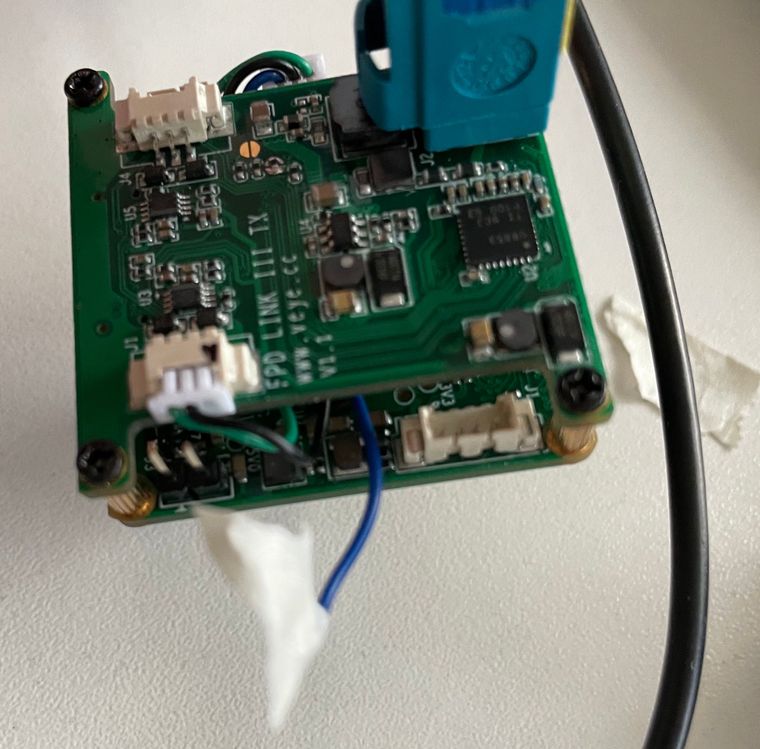
        @veye_xumm I still have blue Images.
        IMG_2777.jpg
        Wire configuration standard.

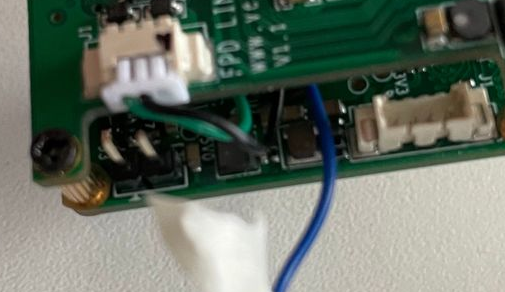
        IMG_2779.jpg
        Changed as reference in http://forum.veye.cc/topic/22/i-want-to-synchronize-the-two-cameras-in-sync-mode/6?_=1616485571342
        IMG_2778.jpg

        Can you please check what i am doing wrong or post a detailed photo of the right configuration.
        Thank you

        veye_xummV 1 Reply Last reply Reply Quote 0
        • veye_xummV Offline
          veye_xumm @g-towboat
          last edited by

          @g-towboat
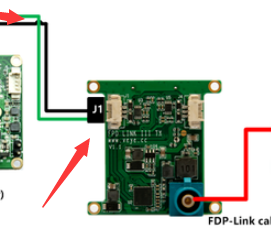
          a67a4f03-e9ec-40b5-8e39-2ff9cc745b42-image.png
          0a42ea95-bb99-4864-ad6f-d99ebb0284a1-image.png
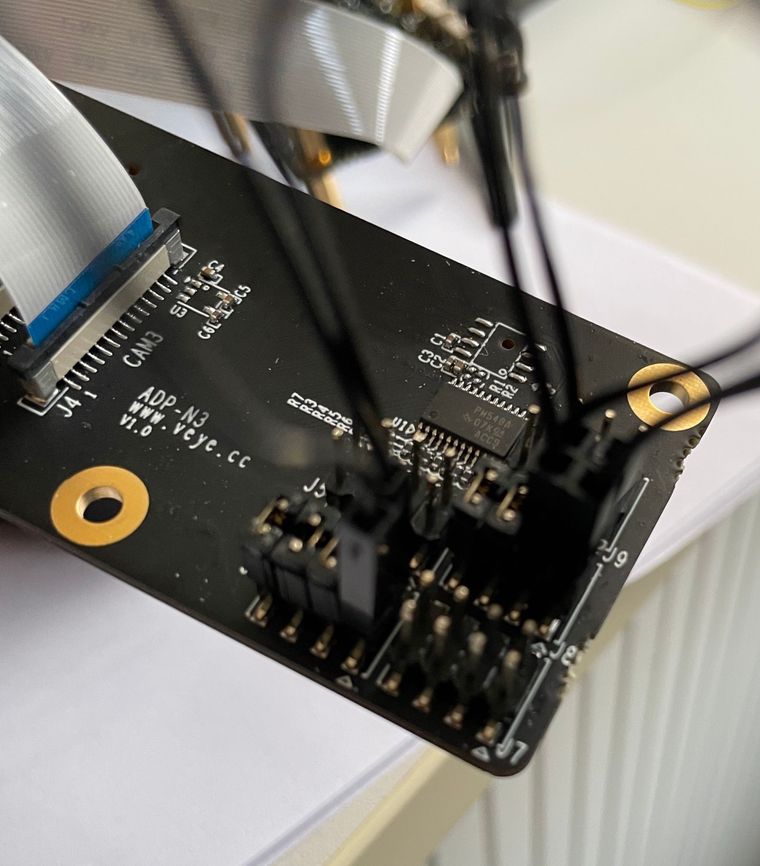
          I think you pick out the wrong wire.

          Questions will be answered as soon as possible, please be patient.
          如果你使用中文,请直接用中文提问。
          May the force be with YOU. (This is the translation of the mysterious Chinese symbol above.)

          G 1 Reply Last reply Reply Quote 0
          • G Offline
            g-towboat @veye_xumm
            last edited by

            @veye_xumm
            SYNC signal connect:
            J7-3 (GPIO0) to J1-3 (GPIO0),
            J7-2 (GND) to J1-2 (GND)

            Do i need to do the wireing on each camera? or just master camera.
            Any other wiring to do?

            veye_xummV 1 Reply Last reply Reply Quote 0
            • veye_xummV Offline
              veye_xumm @g-towboat
              last edited by

              @g-towboat said in Camera sync mode:

              @veye_xumm
              SYNC signal connect:
              J7-3 (GPIO0) to J1-3 (GPIO0),
              J7-2 (GND) to J1-2 (GND)

              Do i need to do the wireing on each camera? or just master camera.

              everyone

              Any other wiring to do?

              no

              Questions will be answered as soon as possible, please be patient.
              如果你使用中文,请直接用中文提问。
              May the force be with YOU. (This is the translation of the mysterious Chinese symbol above.)

              G 1 Reply Last reply Reply Quote 0
              • G Offline
                g-towboat @veye_xumm
                last edited by

                @veye_xumm
                It just work with two cameras but not with 8.
                Any other ideas whats wrong ?

                veye_xummV 1 Reply Last reply Reply Quote 0
                • veye_xummV Offline
                  veye_xumm @g-towboat
                  last edited by

                  @g-towboat
                  pls check you setting following :http://wiki.veye.cc/index.php/FPD_LINK_III_for_Jetson

                  Questions will be answered as soon as possible, please be patient.
                  如果你使用中文,请直接用中文提问。
                  May the force be with YOU. (This is the translation of the mysterious Chinese symbol above.)

                  G 1 Reply Last reply Reply Quote 0
                  • G Offline
                    g-towboat @veye_xumm
                    last edited by

                    @veye_xumm Hi Xumm,

                    I use this script to set sync_mode and master slave config:

                    #!/bin/bash
                    
                    SYNC_INIT="sync_init"
                    STREAM_MODE="streammode"
                    
                    echo -e "connected cameras:"
                    ls -l /dev/video* 
                    
                    echo -e "Set camera 0_1 to Master"
                    sh ./fpdlink3_i2c_jetson.sh -f $SYNC_INIT -p 0 -p1 0 -b 30
                    sh ./cs_mipi_i2c.sh -w -f $STREAM_MODE -p1 1 -p2 0 -b 30 -d 0x3b
                    echo -e "Set camera 0_2 to slave"
                    sh ./fpdlink3_i2c_jetson.sh -f $SYNC_INIT -p 1 -p1 1 -b 30
                    sh ./cs_mipi_i2c.sh -w -f $STREAM_MODE -p1 1 -p2 1 -b 30 -d 0x3c
                    echo -e "Set camera 1_1 to slave"
                    sh ./fpdlink3_i2c_jetson.sh -f $SYNC_INIT -p 0 -p1 1 -b 31
                    sh ./cs_mipi_i2c.sh -w -f $STREAM_MODE -p1 1 -p2 1 -b 31 -d 0x3b
                    echo -e "Set camera 1_2 to slave"
                    sh ./fpdlink3_i2c_jetson.sh -f $SYNC_INIT -p 1 -p1 1 -b 31
                    sh ./cs_mipi_i2c.sh -w -f $STREAM_MODE -p1 1 -p2 1 -b 31 -d 0x3c
                    echo -e "Set camera 2_1 to slave"
                    sh ./fpdlink3_i2c_jetson.sh -f $SYNC_INIT -p 0 -p1 1 -b 32
                    sh ./cs_mipi_i2c.sh -w -f $STREAM_MODE -p1 1 -p2 1 -b 32 -d 0x3b
                    echo -e "Set camera 2_2 to slave"
                    sh ./fpdlink3_i2c_jetson.sh -f $SYNC_INIT -p 1 -p1 1 -b 32
                    sh ./cs_mipi_i2c.sh -w -f $STREAM_MODE -p1 1 -p2 1 -b 32 -d 0x3c
                    echo -e "Set camera 3_1 to slave"
                    sh ./fpdlink3_i2c_jetson.sh -f $SYNC_INIT -p 0 -p1 1 -b 33
                    sh ./cs_mipi_i2c.sh -w -f $STREAM_MODE -p1 1 -p2 1 -b 33 -d 0x3b
                    echo -e "Set camera 3_2 to slave"
                    sh ./fpdlink3_i2c_jetson.sh -f $SYNC_INIT -p 1 -p1 1 -b 33
                    sh ./cs_mipi_i2c.sh -w -f $STREAM_MODE -p1 1 -p2 1 -b 33 -d 0x3c
                    

                    This is the result:

                    ====== Configure master/slave syncmode ====== 
                    
                    connected cameras:
                    crw-rw----+ 1 root video 81,  0 Mär 29 16:25 /dev/video0
                    crw-rw----+ 1 root video 81,  3 Mär 29 16:25 /dev/video1
                    crw-rw----+ 1 root video 81,  6 Mär 29 16:25 /dev/video2
                    crw-rw----+ 1 root video 81,  9 Mär 29 16:25 /dev/video3
                    crw-rw----+ 1 root video 81, 12 Mär 29 16:25 /dev/video4
                    crw-rw----+ 1 root video 81, 15 Mär 29 16:25 /dev/video5
                    crw-rw----+ 1 root video 81, 18 Mär 29 16:25 /dev/video6
                    crw-rw----+ 1 root video 81, 21 Mär 29 16:25 /dev/video7
                    Set camera 0_1 to Master
                    usage: p1, role,0 is master,1 is slave
                    init fpdlink sync mode port 0 role as MASTER!
                    w stream mode master 
                    w streammode 0x 1 slave mode 0x 0 and save param
                    w paramsave,all param will write to flash
                    Set camera 0_2 to slave
                    usage: p1, role,0 is master,1 is slave
                    init fpdlink sync mode port 1 role as SLAVE! 
                    w stream mode slave 
                    w streammode 0x 1 slave mode 0x 1 and save param
                    w paramsave,all param will write to flash
                    Set camera 1_1 to slave
                    usage: p1, role,0 is master,1 is slave
                    init fpdlink sync mode port 0 role as SLAVE! 
                    w stream mode slave 
                    w streammode 0x 1 slave mode 0x 1 and save param
                    w paramsave,all param will write to flash
                    Set camera 1_2 to slave
                    usage: p1, role,0 is master,1 is slave
                    init fpdlink sync mode port 1 role as SLAVE! 
                    w stream mode slave 
                    w streammode 0x 1 slave mode 0x 1 and save param
                    w paramsave,all param will write to flash
                    Set camera 2_1 to slave
                    usage: p1, role,0 is master,1 is slave
                    init fpdlink sync mode port 0 role as SLAVE! 
                    w stream mode slave 
                    w streammode 0x 1 slave mode 0x 1 and save param
                    w paramsave,all param will write to flash
                    Set camera 2_2 to slave
                    usage: p1, role,0 is master,1 is slave
                    init fpdlink sync mode port 1 role as SLAVE! 
                    w stream mode slave 
                    w streammode 0x 1 slave mode 0x 1 and save param
                    w paramsave,all param will write to flash
                    Set camera 3_1 to slave
                    usage: p1, role,0 is master,1 is slave
                    init fpdlink sync mode port 0 role as SLAVE! 
                    w stream mode slave 
                    w streammode 0x 1 slave mode 0x 1 and save param
                    w paramsave,all param will write to flash
                    Set camera 3_2 to slave
                    usage: p1, role,0 is master,1 is slave
                    init fpdlink sync mode port 1 role as SLAVE! 
                    w stream mode slave 
                    w streammode 0x 1 slave mode 0x 1 and save param
                    w paramsave,all param will write to flash
                    

                    Looks good for me.

                    If i ask the i2c bus which mode is configured, i get this:

                    Camera 0_1
                    r streammode 0x 1 slave mode is 0
                    Camera 0_2
                    r streammode 0x 1 slave mode is 1
                    Camera 1_1
                    r streammode 0x 1 slave mode is 1
                    Camera 1_2
                    r streammode 0x 1 slave mode is 1
                    Camera 2_1
                    r streammode 0x 1 slave mode is 1
                    Camera 2_2
                    r streammode 0x 1 slave mode is 1
                    Camera 3_1
                    r streammode 0x 1 slave mode is 1
                    Camera 3_2
                    r streammode 0x 1 slave mode is 1
                    

                    To grab images i use my v4l2-ctl script:

                    #!/bin/bash
                    
                    cameras=7
                    counter=0
                    while [ $counter -le $cameras ]
                    do
                    	echo -e "Camera_"$counter
                    	v4l2-ctl --device /dev/video$counter --stream-mmap --stream-to=frame_$counter.raw --stream-count=1
                    	convert -size 1920x1080 -depth 16 uyvy:frame_$counter.raw frame_$counter.png
                    	((counter++))
                    done
                    

                    Camera 1 images looks good.
                    some cameras a purple some are blue!

                    ![0_1617029969347_frame_1.png](Lade 100% hoch)

                    Do you need more informations? Or do you have any ideas whats wrong?

                    veye_xummV 1 Reply Last reply Reply Quote 0
                    • veye_xummV Offline
                      veye_xumm @g-towboat
                      last edited by veye_xumm

                      @g-towboat

                      @g-towboat said in Camera sync mode:

                      some cameras a purple some are blue!
                      ![0_1617029969347_frame_1.png](Lade 100% hoch)
                      Do you need more informations? Or do you have any ideas whats wrong?

                      which one is purple,which one is blue?
                      I think the script is good. It might be wire connection problem.
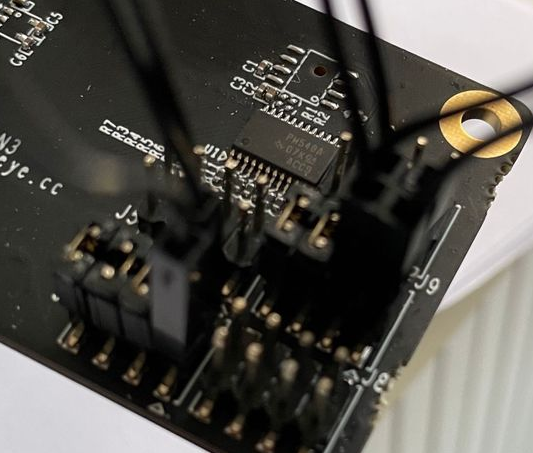
                      189b0505-8d7b-48f8-8834-bb1b00c51b08-image.png
                      Could you draw a sketch of this part? let me have a look.

                      Questions will be answered as soon as possible, please be patient.
                      如果你使用中文,请直接用中文提问。
                      May the force be with YOU. (This is the translation of the mysterious Chinese symbol above.)

                      G 1 Reply Last reply Reply Quote 0
                      • G Offline
                        g-towboat @veye_xumm
                        last edited by

                        @veye_xumm
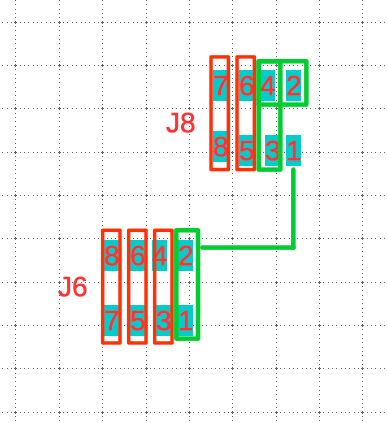
                        Hi here is my drawing:

                        Bildschirmfoto 2021-03-30 um 07.57.41.png

                        Red: the jumpers
                        Green: the two black delivered wires

                        Following cameras showing this kind of image:

                        Camera 1 /dev/video0 image ok
                        Camera 2 /dev/video1 blue image
                        Camera 3 /dev/video2 purple image
                        Camera 4 /dev/video3 image ok
                        Camera 5 /dev/video4 purple image
                        Camera 6 /dev/video5 blue image
                        Camera 7 /dev/video6 purple image
                        Camera 8 /dev/video7 blue image

                        veye_xummV 1 Reply Last reply Reply Quote 0
                        • veye_xummV Offline
                          veye_xumm @g-towboat
                          last edited by

                          @g-towboat
                          I think your wire connection is ok. Do you install a lens on your camera?
                          I don't understand the purple image.
                          Please post a purple image and a blue image. let me look at it.

                          Questions will be answered as soon as possible, please be patient.
                          如果你使用中文,请直接用中文提问。
                          May the force be with YOU. (This is the translation of the mysterious Chinese symbol above.)

                          G 2 Replies Last reply Reply Quote 0
                          • G Offline
                            g-towboat @veye_xumm
                            last edited by

                            @veye_xumm
                            No special lens on the cameras - just the standard from veye
                            Here is an image

                            frame_4.png

                            veye_xummV 1 Reply Last reply Reply Quote 0
                            • veye_xummV Offline
                              veye_xumm @g-towboat
                              last edited by

                              @g-towboat
                              Hi, I think this camera has no lens mounted. Is it true ?

                              Questions will be answered as soon as possible, please be patient.
                              如果你使用中文,请直接用中文提问。
                              May the force be with YOU. (This is the translation of the mysterious Chinese symbol above.)

                              G 1 Reply Last reply Reply Quote 0
                              • G Offline
                                g-towboat @veye_xumm
                                last edited by

                                @veye_xumm
                                A lens is connected on all camera. If i switch back the configuration to "free run" on each camera, all images look normal.

                                veye_xummV 1 Reply Last reply Reply Quote 0
                                • veye_xummV Offline
                                  veye_xumm @g-towboat
                                  last edited by

                                  @g-towboat
                                  Have you checked the firmware version of each camera?
                                  http://wiki.veye.cc/index.php/CS-MIPI-IMX307_version_log

                                  4b08e003-f808-4082-8df8-27dfc40de1f9-image.png
                                  Make sure firmware version is newer than 2.33.

                                  Questions will be answered as soon as possible, please be patient.
                                  如果你使用中文,请直接用中文提问。
                                  May the force be with YOU. (This is the translation of the mysterious Chinese symbol above.)

                                  G 1 Reply Last reply Reply Quote 0
                                  • G Offline
                                    g-towboat @veye_xumm
                                    last edited by

                                    @veye_xumm last week i installed version 2.36

                                    1 Reply Last reply Reply Quote 0
                                    • G Offline
                                      g-towboat @veye_xumm
                                      last edited by

                                      @veye_xumm sorry i forgot to upload the blue image

                                      frame_1.png

                                      veye_xummV 1 Reply Last reply Reply Quote 1
                                      • veye_xummV Offline
                                        veye_xumm @g-towboat
                                        last edited by

                                        @g-towboat
                                        I am REALLY REALLY sorry. I uploaded the wrong version fpdlink3_i2c_jetson.sh before.

                                        Please download the newest version I upload to github.
                                        https://github.com/veyeimaging/nvidia_jetson_veye_bsp/tree/master/i2c_cmd/bin
                                        It works fine here.
                                        Sorry again.

                                        Questions will be answered as soon as possible, please be patient.
                                        如果你使用中文,请直接用中文提问。
                                        May the force be with YOU. (This is the translation of the mysterious Chinese symbol above.)

                                        G 1 Reply Last reply Reply Quote 0
                                        • G Offline
                                          g-towboat @veye_xumm
                                          last edited by

                                          @veye_xumm
                                          i have installed the new version. it looks good for now. One question do i need to set the fpdlink-settings after each reboot?

                                          veye_xummV 1 Reply Last reply Reply Quote 0
                                          • veye_xummV Offline
                                            veye_xumm @g-towboat
                                            last edited by

                                            @g-towboat
                                            It is really nice.

                                            @g-towboat said in Camera sync mode:

                                            One question do i need to set the fpdlink-settings after each reboot?

                                            ./fpdlink3_i2c_jetson.sh -f sync_init .....
                                            This cmd need to set after each reboot.

                                            ./cs_mipi_i2c.sh -w -f streammode
                                            The camera can save streammode.

                                            Questions will be answered as soon as possible, please be patient.
                                            如果你使用中文,请直接用中文提问。
                                            May the force be with YOU. (This is the translation of the mysterious Chinese symbol above.)

                                            1 Reply Last reply Reply Quote 0

                                            Hello! It looks like you're interested in this conversation, but you don't have an account yet.

                                            Getting fed up of having to scroll through the same posts each visit? When you register for an account, you'll always come back to exactly where you were before, and choose to be notified of new replies (either via email, or push notification). You'll also be able to save bookmarks and upvote posts to show your appreciation to other community members.

                                            With your input, this post could be even better 💗

                                            Register Login
                                            • First post
                                              Last post